By Syed Ali Ul Hasan

About Ceph
Ceph is an open-source distributed storage platform designed to provide scalable, reliable, and highly available storage. It supports multiple storage interfaces, including object, block, and file storage, through a unified distributed storage system.
Ceph is built around RADOS (Reliable Autonomic Distributed Object Store), which provides the underlying storage layer. Different Ceph components build on top of RADOS to provide specialized storage services:
- RBD (RADOS Block Device) provides block storage through virtual disk images.
- CephFS provides a distributed file system.
- RADOS Gateway (RGW) provides object storage through APIs compatible with systems such as Amazon S3.
- Ceph Manager (Ceph MGR) provides management and monitoring functionality, including the Ceph Dashboard.
The Ceph Dashboard is a web-based management interface for monitoring and administering a Ceph cluster. It exposes information and operations across several areas of the cluster, including hosts, pools, OSDs, RBD images, object gateway resources, CephFS, SMB, and administrative configuration.
As the number of resources and management capabilities exposed by the Dashboard has grown, presenting this information in a clear and consistent way has become increasingly important.
Project Overview
The core objective of my Google Summer of Code 2026 project was to modernize the navigation and information architecture of the Ceph Dashboard.
Traditionally, many dashboard resources were presented through deeply nested tables and tabs. While functional, this approach made it difficult to navigate high-density storage information and resulted in inconsistent experiences across different modules.
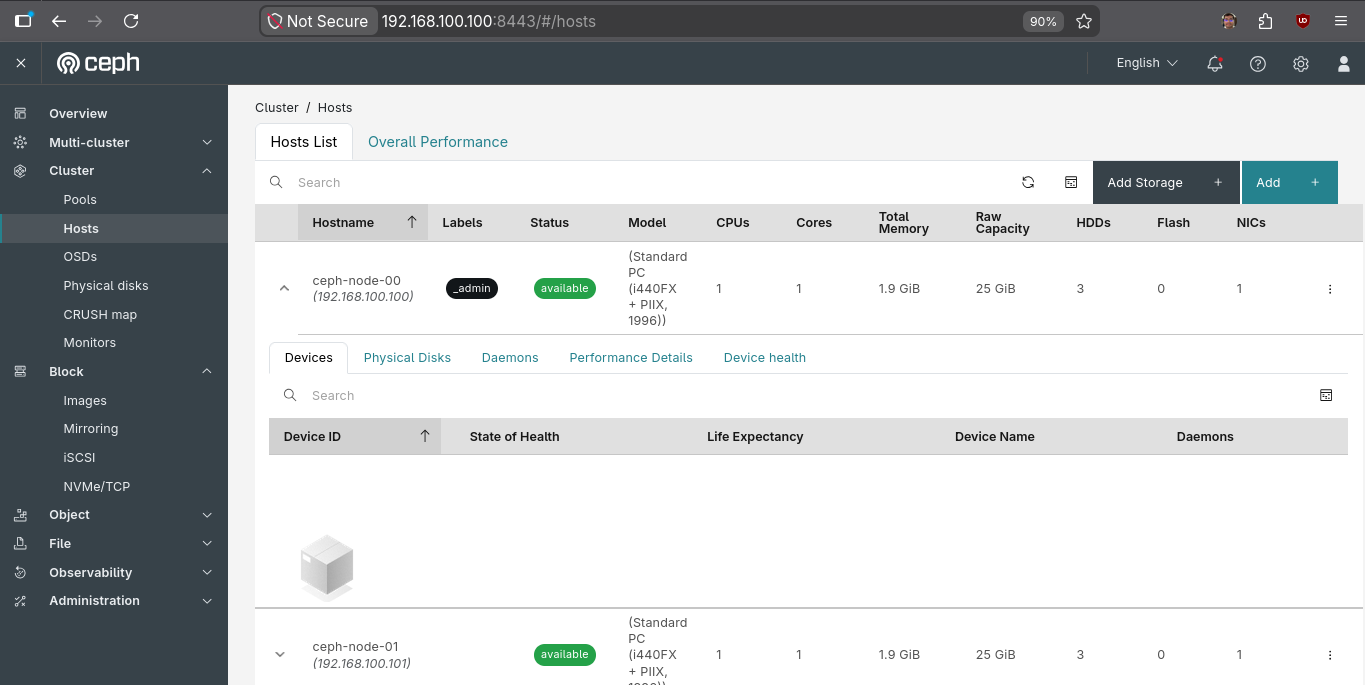
As part of the project, I led the migration of these views to a unified Resource Page architecture built on the IBM Carbon Design System. The new architecture separates resource navigation from resource-specific content, providing users with a consistent way to explore information while allowing individual modules to present content according to their own requirements.
Resource Page Architecture
The new Resource Page architecture replaces deeply nested table views with a structured, sidebar-driven experience.
Each resource page consists of a navigation panel on the left and a dedicated content area on the right. The sidebar provides logical sections such as Overview, Devices, Configuration, and Performance, while the content area is designed to accommodate resource-specific information such as Details Cards, tables, charts, and actions.
At the center of the Overview experience is the Details Card, which provides a consistent way of presenting important resource metadata.
The goal was not simply to replace tabs with a sidebar. The architecture separates navigation concerns from resource-specific content, allowing modules to share common infrastructure while still having the flexibility to design an appropriate experience for each resource.
Project Goals & Tasks
- Introduce a generic, shared Details Card component capable of displaying fields of different types.
- Introduce a reusable Page Header component for resource pages.
- Migrate 20+ module table tabs to the Resource Page architecture.
- Refactor and update existing unit and E2E tests affected by the migration.
- Improve consistency across resource navigation and information presentation.
Technologies Used
- Angular & TypeScript for the dashboard frontend
- IBM Carbon Design System for the UI
- Jest for unit testing
- Cypress for E2E testing
Migration Strategy
The migration started with the Cluster section, beginning with Hosts, and then progressed through modules under Object, Block, File, Observability, and Administration.
The NVMe Gateway implementation was used as an initial reference for the Resource Page pattern, together with the designs provided for Hosts. The Hosts migration established the structure for sections such as Overview, Daemons, Storage Devices, and Performance.
Each resource page follows a consistent navigation model:
- Overview is the first item in the sidebar.
- Resource-specific sections follow according to the information available for that resource.
- Grafana dashboards previously presented under Performance Details are now placed under Performance.
- When a resource has only one navigation item, the sidebar is hidden to avoid unnecessary navigation chrome.
File Structure
The migration is organized into two main areas:
resource-sidebarhandles resource navigation and defines the items displayed in the sidebar. It works with the sharedsidebar-layoutcomponent to provide navigation and page structure.resource-pagecontains the resource-specific content, including Details Cards, tables, graphs, and other module-specific UI.
This separation keeps navigation concerns independent from resource content, allowing different modules to customize their Overview and other sections without duplicating the common navigation infrastructure.
src/app/ceph/cluster/hosts/
├── host-resource-sidebar/
│   ├── host-resource-sidebar.component.html
│   ├── host-resource-sidebar.component.ts
│   ├── host-resource-sidebar.component.scss
│   └── host-resource-sidebar.component.spec.ts
└── host-resource-page/
    ├── host-resource-breadcrumb.resolver.ts
    ├── host-resource-page.component.html
    └── host-resource-page.component.scss
Page Header Component
The Page Header component was introduced to provide a consistent header experience for resource pages.
Previously, the global dashboard layout primarily displayed the page title and breadcrumbs.

The new Page Header provides a richer context for the resource being viewed:
- Breadcrumbs - Shows the resource's location within the dashboard information architecture.
- Resource Name - Clearly identifies the current resource.
- Tags - Allows user-provided labels to be displayed alongside the resource.
- Status - Communicates the current state of the resource.
- Actions - Provides access to primary or secondary actions relevant to the resource.

The component was designed as a reusable building block so that the same header experience could be applied consistently across different resource types.
Details Card (Resource Overview Card)
The Details Card is a shared component used to present important metadata about a resource.
It is intended to appear near the top of the Overview section and can display information such as versions, creation dates, IDs, statuses, tags, and other resource-specific properties.
While Carbon provides a Details Card through its React implementation, an equivalent component had to be developed for the Angular-based Ceph Dashboard.
The component supports inputs for:
- Title
- Fields
- Columns
Fields can currently be represented using different types, including text, tags, password, and status.

The component was designed to be generic so that individual modules do not need to implement their own versions of the same metadata presentation pattern.
Migrating the Modules
The Resource Page architecture was progressively applied across the dashboard. Each migration involved more than changing the visual layout: existing navigation, content presentation, actions, and tests had to be adapted to the new structure.
Cluster: Hosts
Hosts was the first major module migrated to the Resource Page architecture.
The migration introduced dedicated sections for:
- Overview
- Daemons
- Storage Devices
- Performance
The Overview provides a consolidated view of host information using the new Page Header and Details Card, while the remaining sections provide focused views for host-related information.
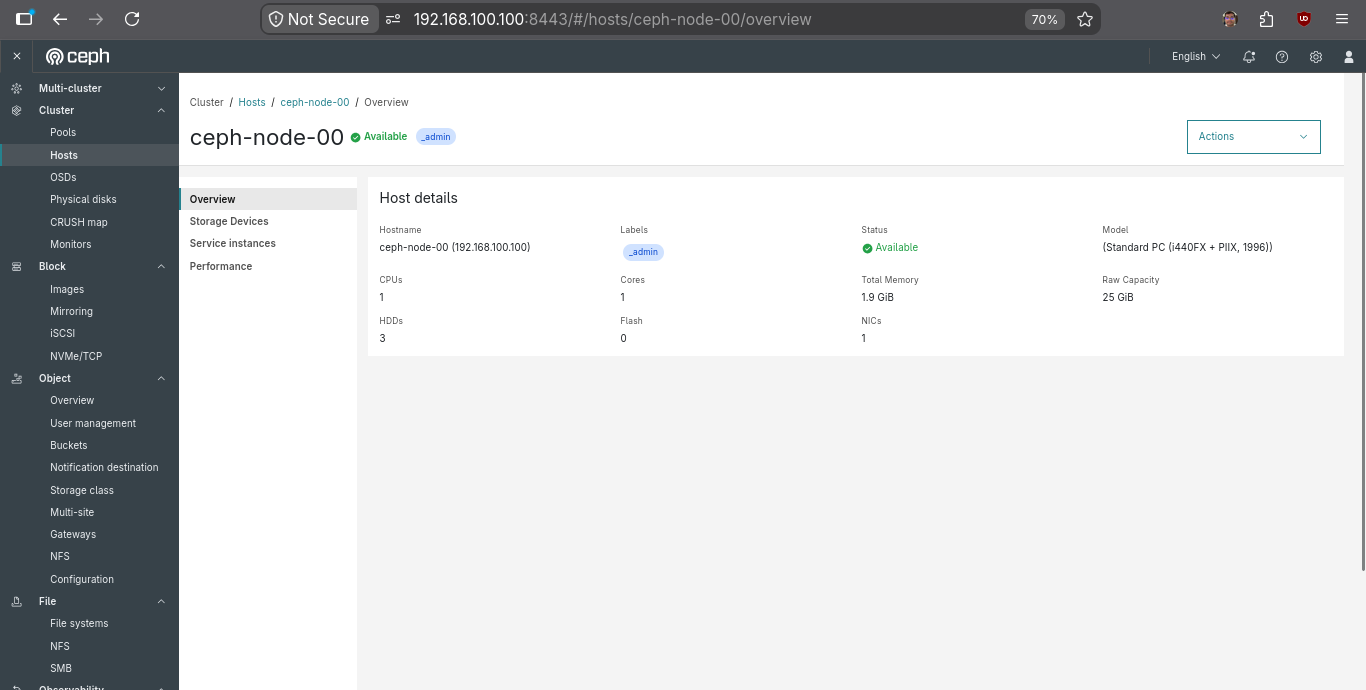
The Hosts implementation became an important reference for subsequent migrations.
Pools & OSDs
Pools are logical namespaces within Ceph used to organize RADOS objects and define storage policies such as replication or erasure coding. OSDs (Object Storage Daemons) are the services responsible for storing data and handling data operations on the underlying storage devices.
The Pools migration introduced additional content into the Resource Page architecture, including a new Usage & Data Protection card and a Read/Write IOPS card.
The legacy sparkline visualizations were also migrated to use the area-chart component so that the IOPS visualization remained consistent with the dashboard landing Overview page.
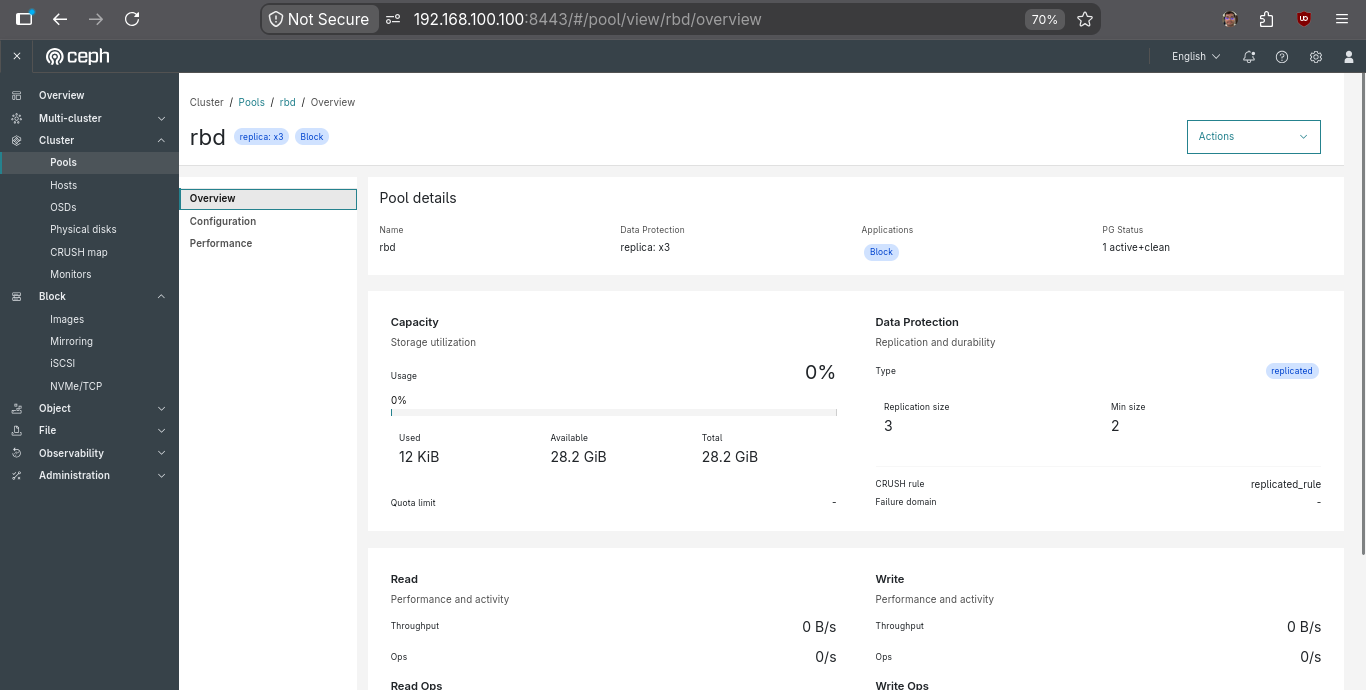
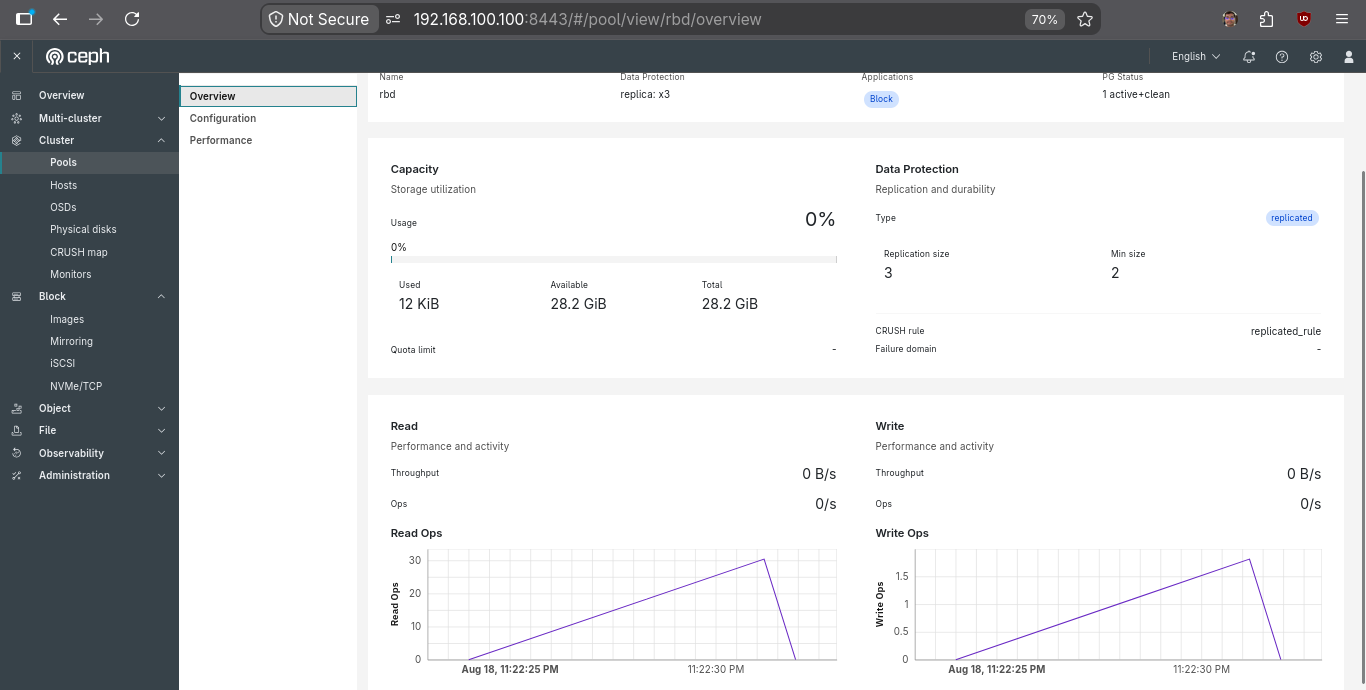
A similar Resource Page structure was implemented for OSDs, adapting the architecture to the information and actions specific to block storage devices.
Objects: RGW, Buckets & More
RADOS Gateway (RGW) provides Ceph with an object storage interface through REST APIs compatible with services such as Amazon S3. It allows applications to store and retrieve objects through buckets.
The Object Gateway section contains several resource types, including Buckets, Users, Storage Classes, Gateways, Notification Destinations, and Multisite Sync Policies.
These modules were migrated to the Resource Page architecture while adapting the navigation and content to the requirements of each resource.
For Buckets, the migration introduced:
- A resource Details Card
- A Configuration section containing the tags table
- Permissions
- Data Management
- Notifications
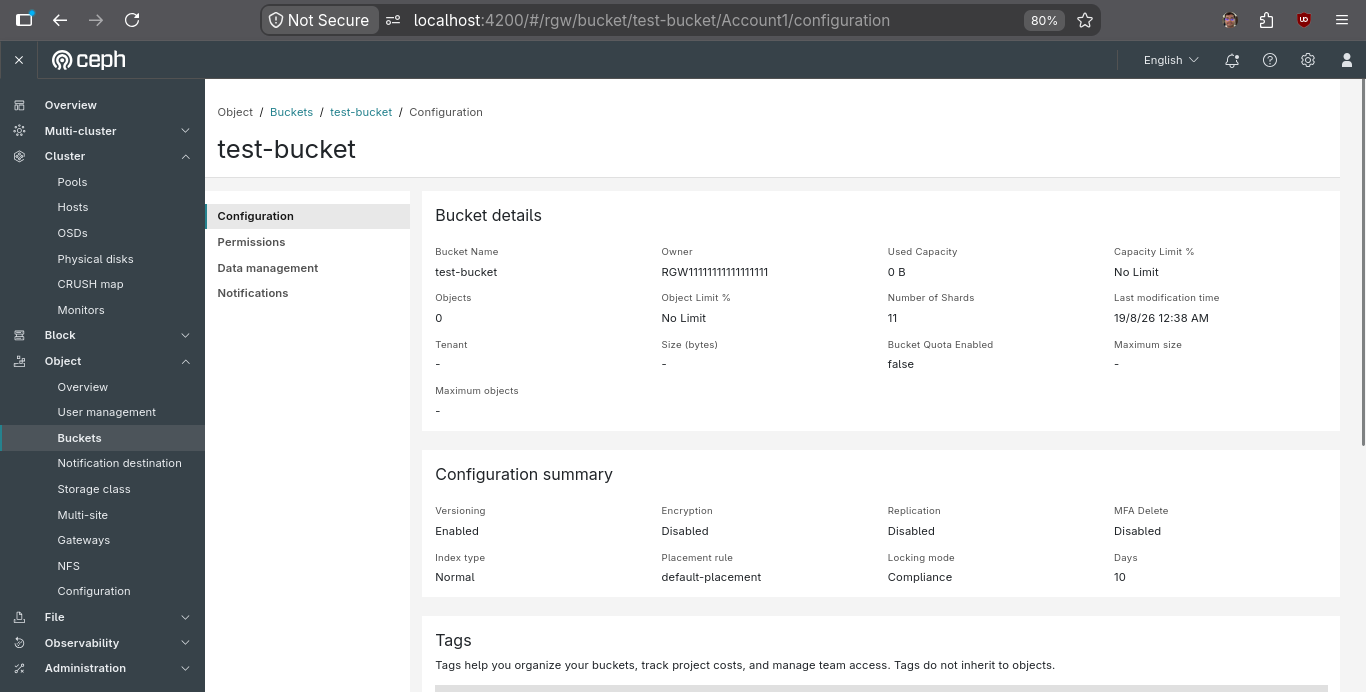
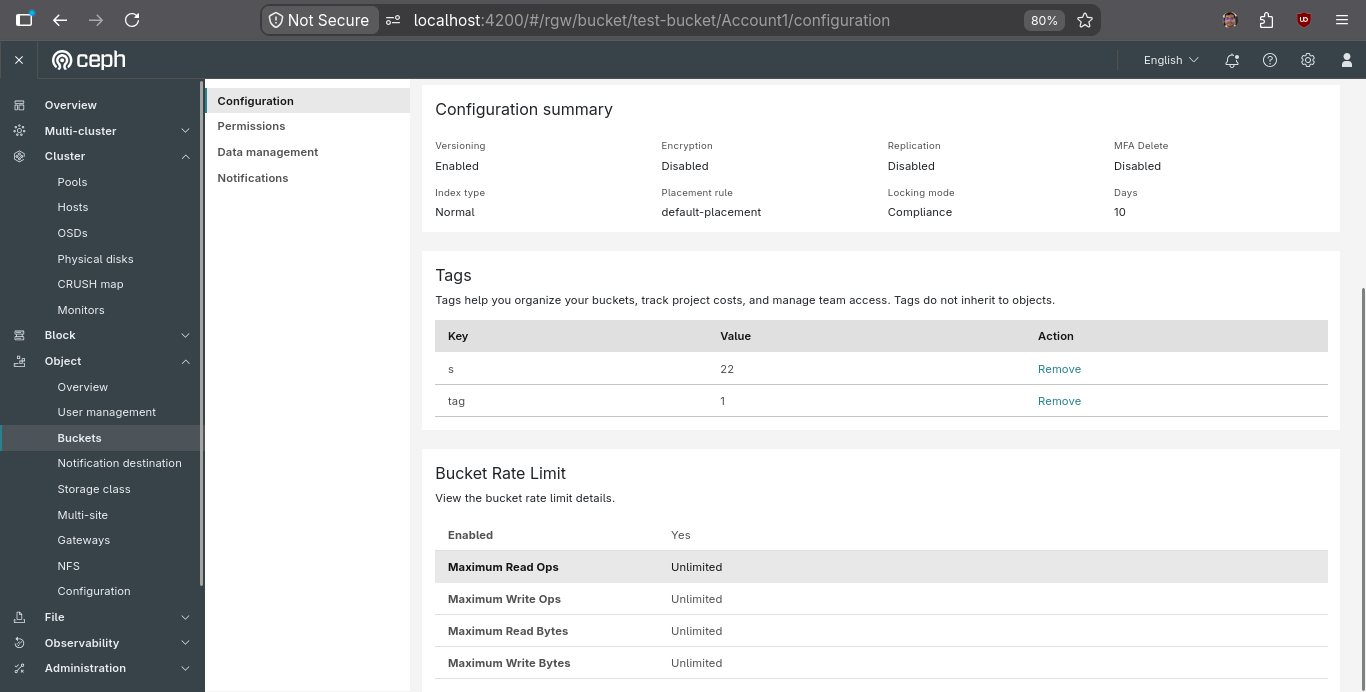
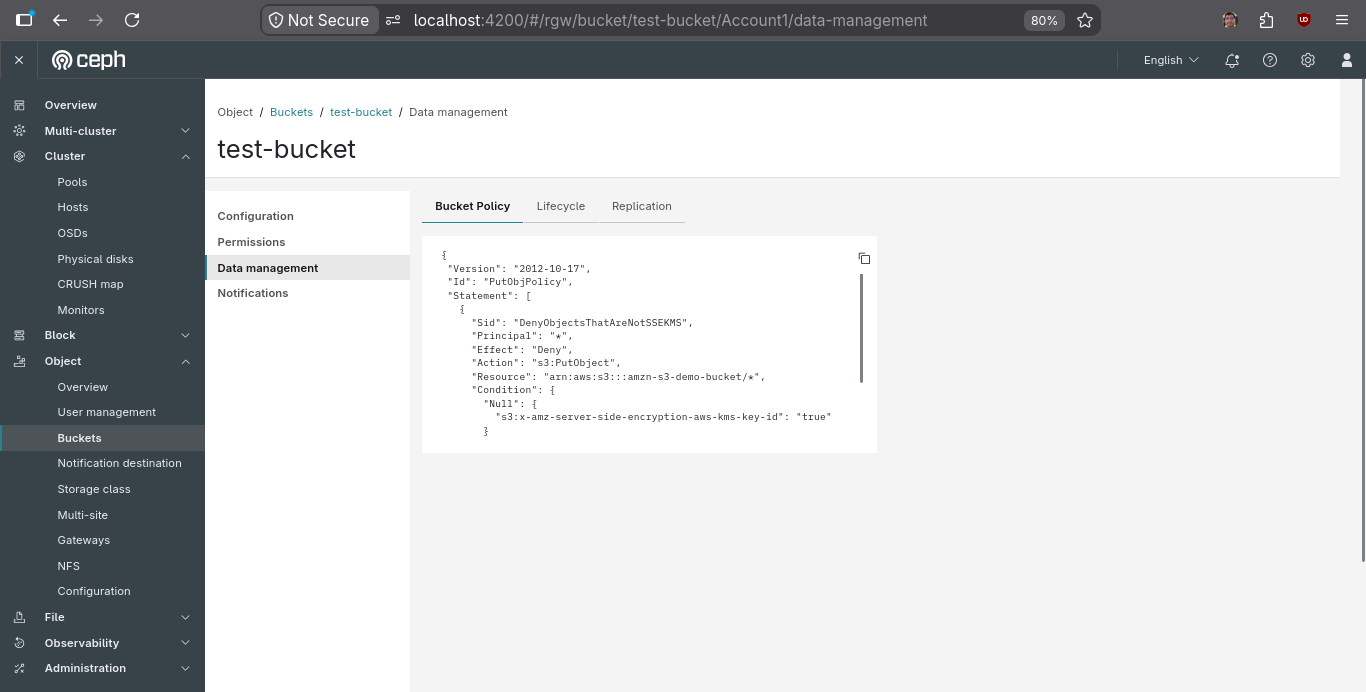
The same architecture was subsequently applied to other Object Gateway resources, including Notification Destination, User Management, Storage Class, Gateways, and Multi-site Sync Policy.
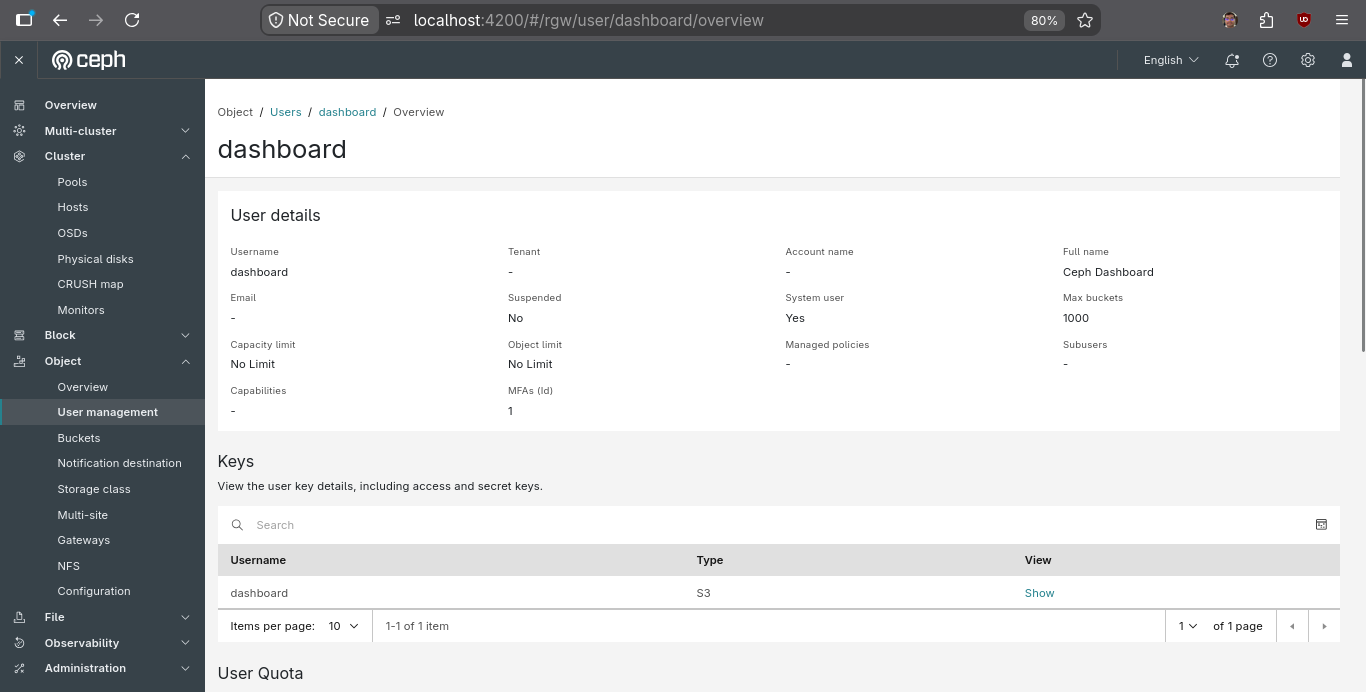
The sidebar behavior was also standardized across these resources. When only a single navigation item is available, the sidebar is automatically hidden to keep the page visually clean.
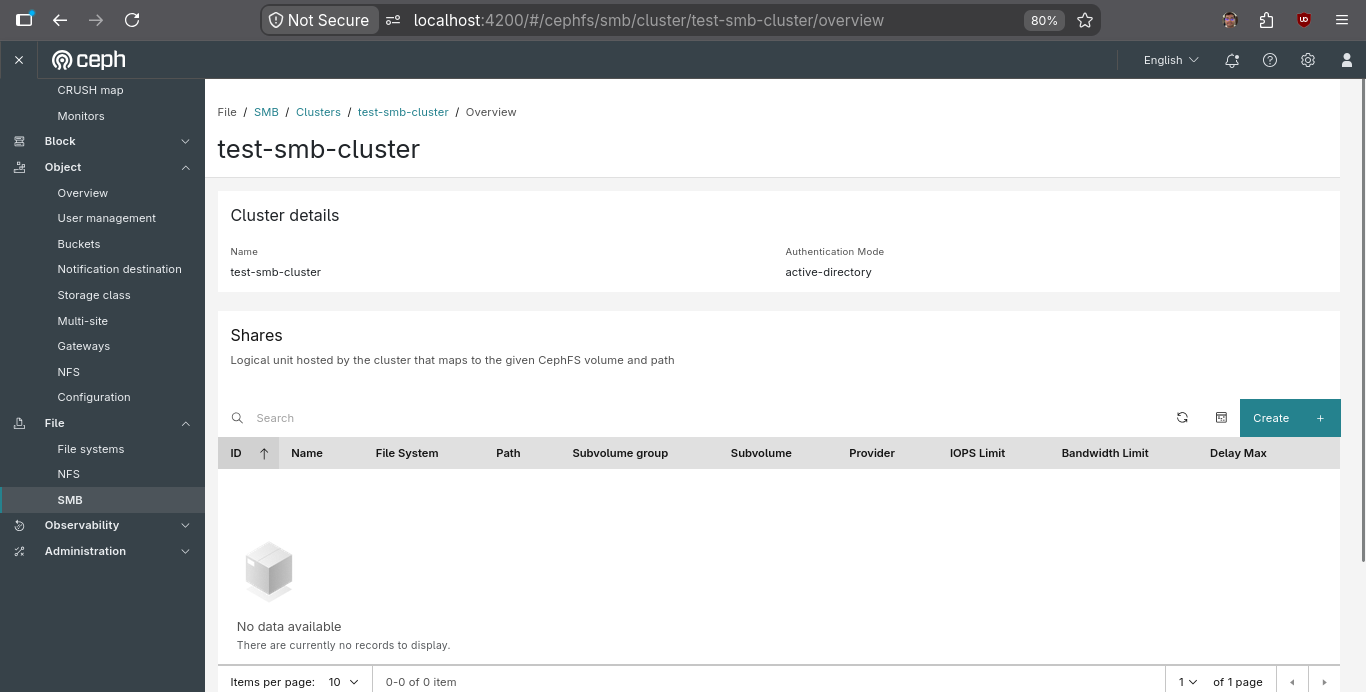
SMB
Ceph SMB integrates Samba-based Server Message Block (SMB) file sharing with CephFS, allowing Ceph to provide file shares through the SMB protocol.
The Resource Page architecture was introduced for the two SMB modules:
- Cluster
- Standalone
Both modules were adapted to use the common navigation and resource page structure while retaining their module-specific content and actions.
Administration
The same architecture was then applied to the Administration section.
The migrated modules included:
- Manager Modules
- Configuration
- Services
Each module follows the same navigation and content architecture while exposing the information and controls specific to its purpose.
Blocks
RBD (RADOS Block Device) provides Ceph block storage through virtual disk images that can be used by virtual machines and other clients.
The Resource Page architecture was extended to RBD Images, replacing the previous table-tab navigation with the new sidebar-driven layout.
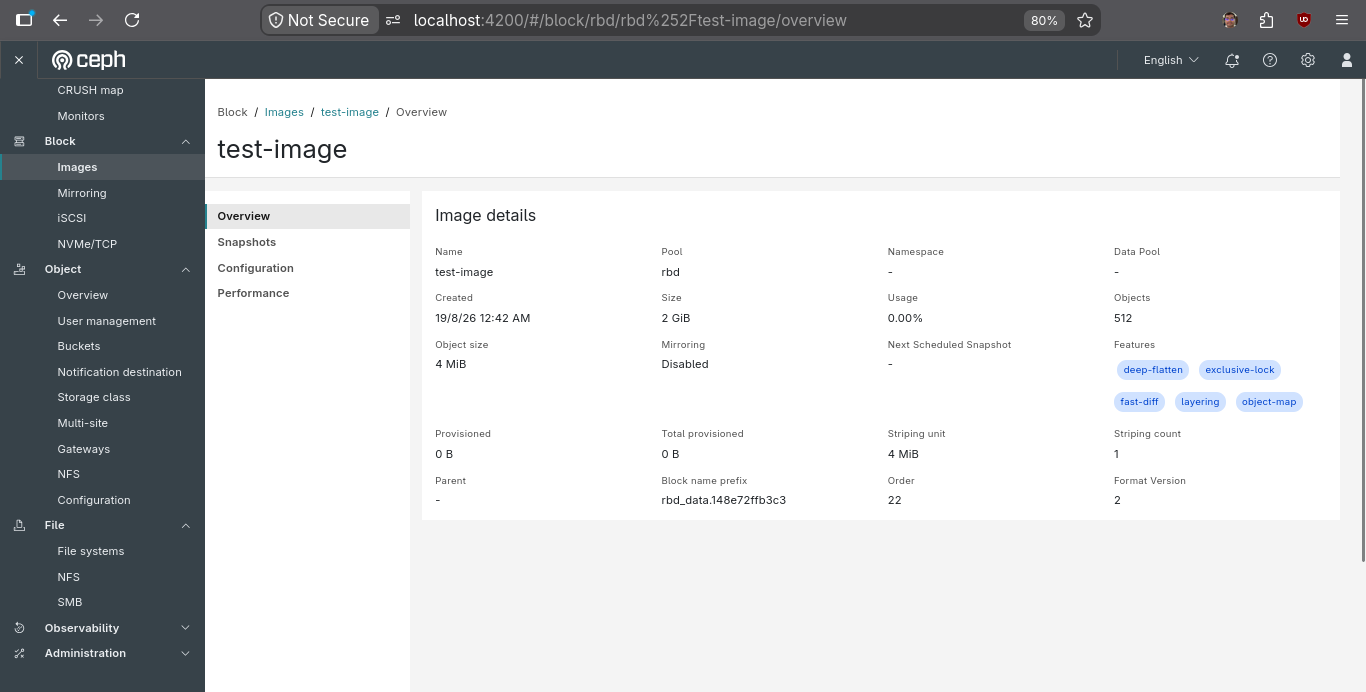
The same architectural principles were applied while keeping the content and actions specific to RBD resources.
Testing & Quality Assurance
Testing was an integral part of the migration. Since the project changed the navigation structure and DOM architecture across more than 20 resource views, the impact extended beyond the newly introduced components.
Unit Testing
Using Jest, I wrote and updated unit tests for the newly introduced shared components, including the Details Card and Page Header.
The tests covered dynamic behavior such as:
- Different field types
- Tags
- Resource statuses
- Loading states
- Multiple column configurations
- Component inputs and rendering behavior
I also extended tests for existing components affected by the architectural changes.
End-to-End Testing
The migration from nested table tabs to sidebar-driven Resource Pages changed the DOM structure across multiple modules, which caused a number of existing Cypress tests to require updates.
I refactored E2E tests across modules including:
- Pools
- OSDs
- Buckets
- Users
- Manager Modules
- Other migrated resource pages
The updated tests validate critical user flows such as:
- Sidebar navigation
- Resource page rendering
- Data presentation
- Form interactions
- Resource-specific actions
This ensured that the architectural migration did not introduce regressions into existing functionality.
Key Contributions & Milestones
The following contributions represent the major building blocks of the Resource Page migration.
Shared Components & Carbonization
- mgr/dashboard: carbonize OSD form component #68031
- mgr/dashboard: carbonized Login form #68096
- mgr/dashboard: added a new page header component #70520
- mgr/dashboard: added loading state to resource-overview card #71045
Resource Page Migrations
- mgr/dashboard: migrated hosts table tabs to resource pages #69136
- mgr/dashboard: converted pool list table tabs to resource pages #69189
- mgr/dashboard: revamped hosts resource page overview #69468
- mgr/dashboard: migrated bucket table tabs to resource pages #69608
- mgr/dashboard: migrated User Table Tabs to resource pages #69790
- mgr/dashboard: migrated accounts table tabs to resource pages #69807
- mgr/dashboard: migrated storage class table tabs to resource pages #69891
- mgr/dashboard: migrated notification destination table tabs to resource pages #69924
- mgr/dashboard: migrated images table tabs to resource pages #70410
- mgr/dashboard: migrated objects gateways tabs to resource pages #70540
- mgr/dashboard: rgw gateway switcher read-only for resource #70544
- mgr/dashboard: migrated SMB clusters tabs to resource page #70548
- mgr/dashboard: migrate SMB standalone to resource page #70760
- mgr/dashboard: migrate mgr-module to resource page #70764
- mgr/dashboard: migrated config table tab to resource page #70778
- mgr/dashboard: migrate multisite sync-policy table tab to resource page #70857
- mgr/dashboard: migrate service table tabs to resource page #70893
- mgr/dashboard: migrate cephfs table tabs to resource pages #70929
- mgr/dashboard: migrate OSD table tabs to resource pages #70946
Testing & Quality Improvements
- mgr/dashboard (test): refactored tests and resolved TODOs #68072
- mgr/dashboard (test): RBD Snapshot mirroring toggle test #68075
- mgr/dashboard: fix status field on host ceph-dev setup #70978
- mgr/dashboard: format last modif time with CdDatePipe #70982
Community Contribution
You can track the current state of these features under the Ceph tracker.
Challenges Faced
One of the initial challenges was understanding the scale and structure of the Ceph Dashboard codebase. Since this was my first experience working with a large Angular application, it took time to understand the existing architecture, module boundaries, shared components, and established patterns.
Another early challenge was the documentation and design phase. Since the Resource Page architecture was intended to be reused across many modules, it was important to define a structure that provided consistency without restricting modules from presenting resource-specific information. This required studying existing implementations, understanding the requirements of different modules, and iterating on the proposed architecture.
The initial pull requests also presented several challenges. While becoming familiar with the codebase, some implementations introduced DRY violations or did not fully align with existing project conventions. There were also cases where changes resulted in broken UI behavior or required refactoring after review.
Testing introduced another layer of complexity. The migration significantly changed the DOM structure and navigation model, which caused existing Cypress E2E tests to break. Updating those tests required understanding not only the new UI but also the intent behind the existing test flows.
These challenges were gradually overcome through deeper exploration of the codebase, iterative implementation, debugging, testing, and continuous review. Each iteration helped me understand the reasoning behind existing patterns and become more confident in making changes across a large open-source project.
Learnings & Key Takeaways
Working on a large and mature open-source codebase initially felt intimidating, especially since this was my first experience working with Angular at scale. Over time, I became more comfortable navigating the Ceph Dashboard architecture, understanding its design patterns, and contributing changes that aligned with existing system conventions.
One of the most important learnings from this project was the value of designing reusable and generic components. Building shared components such as the Details Card and Page Header required thinking beyond individual use cases and focusing on long-term maintainability, extensibility, and consistency across multiple modules.
This project also significantly strengthened my understanding of Angular and TypeScript in a real-world production system. I gained hands-on experience with component architecture, shared modules, routing, pipes, and testing strategies, while also learning how to structure frontend code that scales across a large application.
Another key takeaway was the importance of incremental development and iterative code review. Many of my contributions evolved through review feedback, which helped me improve code quality, reduce redundancy, and better align with established principles such as DRY, modularity, and reusability.
Beyond technical skills, this experience gave me valuable insight into how large open-source projects operate. I learned how design discussions, implementation decisions, testing strategies, and documentation come together in a collaborative environment involving contributors from across the world.
Overall, this project significantly improved my ability to work independently in a complex codebase, think in terms of system-wide architecture rather than isolated features, and contribute code that is maintainable, scalable, and production-ready.
Final Outcome
The Resource Page migration was extended across 20+ resource views spanning the Cluster, Object, Block, File, Observability, and Administration areas of the Ceph Dashboard.
The project resulted in:
- A unified Resource Page architecture for migrated modules.
- A reusable Page Header component.
- A generic Details Card component supporting multiple field types.
- Consistent sidebar-based navigation across resource pages.
- Migration of existing table-tab interfaces across more than 20 resource views.
- Updated Jest unit tests for shared and affected components.
- Refactored Cypress E2E tests to support the new navigation architecture.
- A new loading state for the Resource Overview Card.
- Additional UI consistency and quality improvements across migrated modules.
Most of the migration PRs have been merged, with a few remaining under review. The work establishes a reusable foundation for further improvements to the Ceph Dashboard's resource-oriented experiences.
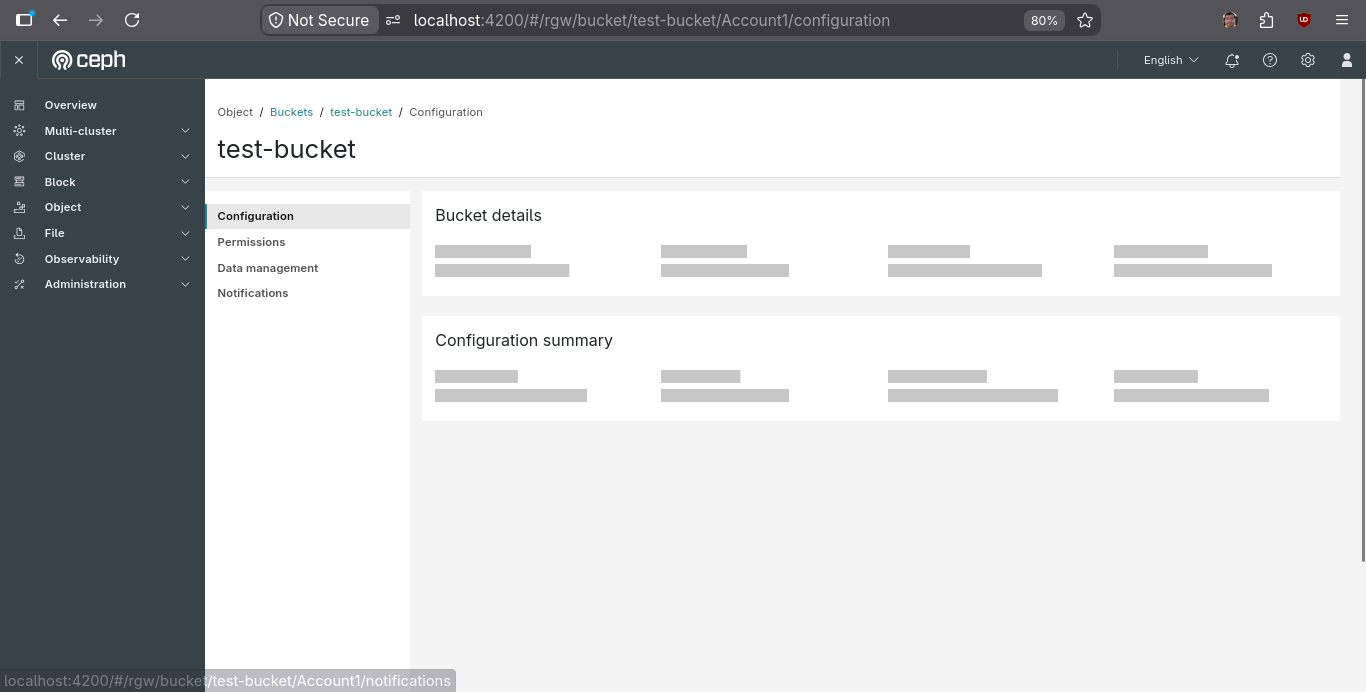
Here is a walkthrough video of all the Resource Pages:
Future Improvements
The Resource Page architecture provides a foundation for several future improvements across the dashboard:
- Extend the
page-header-resourcecomponent to support tabs where required, allowing the shared layout infrastructure to support both side navigation and header-based navigation. - Refactor and rename the existing
sidebar-layoutcomponent where appropriate to better represent its broader navigation responsibilities. - Add throughput legends to the Read/Write IOPS graphs on the Pools Overview.
- Extend the
page-header-resourcecomponent beyond resource pages so that the same header experience can be used consistently across other dashboard layouts.
Acknowledgement
I want to extend my deepest gratitude to my primary mentor, Afreen, as well as my co-mentors, Abhishekh and Dnyaneshwari, for their unwavering support, guidance, and encouragement throughout this journey. Their thoughtful reviews and continuous feedback played a crucial role in shaping both the technical and design aspects of my contributions.
I am especially grateful for the emphasis they placed on documentation, code quality, and thoughtful design. Their reviews consistently pushed me to look beyond simply making something work and focus on writing code that is clean, reusable, and maintainable.
I am also sincerely thankful to the broader Ceph Dashboard team, especially Ankush and Nizam, for creating such a welcoming, collaborative, and supportive environment. Being part of a foundational open-source project like Ceph has been an incredibly enriching experience and a major milestone in my growth as a developer.
GSoC 2026 has been a transformative learning journey, and I am deeply grateful to everyone in the Ceph community who contributed to making this experience so meaningful. I am excited to see how these changes continue to improve the Ceph Dashboard and the experience of Ceph users worldwide.
~ Syed